
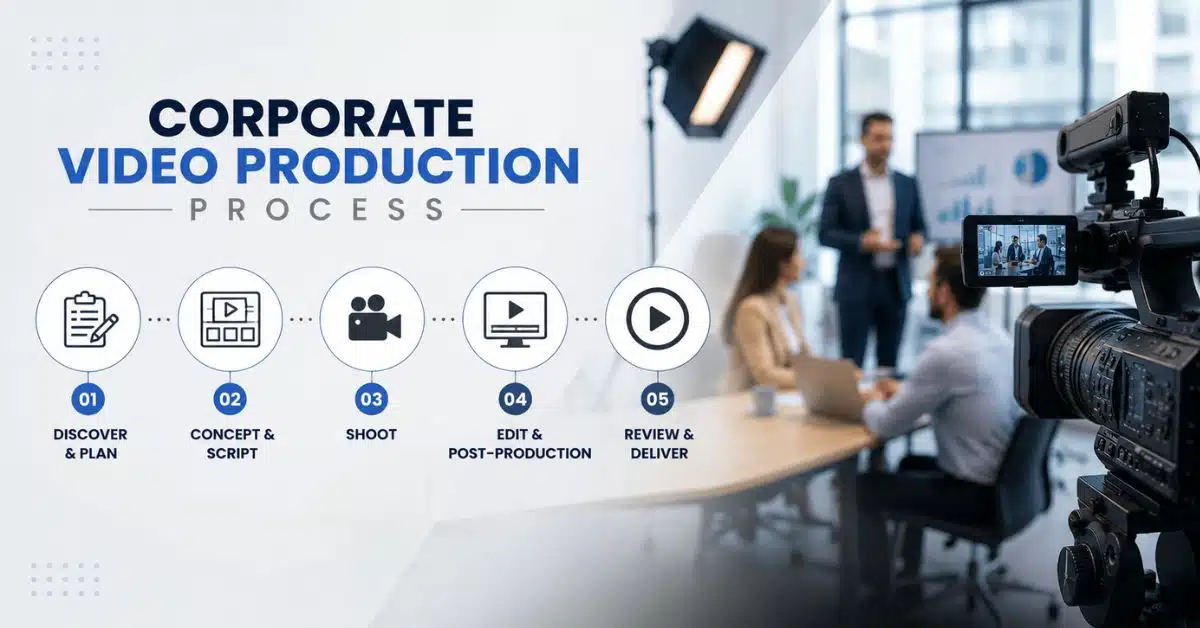

Most businesses that request a corporate video assume it’s a one-week project. Could you write a script, film it, and be done? In practice, a corporate video moves through several distinct stages, and skipping any one of them shows up in the final result, whether that’s a shaky script, mismatched pacing, or audio that doesn’t sit right with the visuals.
This guide walks through what actually happens between the first client call and the final file landing in your inbox. If you’re planning your first corporate video or you just want to know what you’re paying for, this breakdown should clear things up.
Stage 1: Discovery and Strategy
Every project like this starts with a conversation, not a camera. The production team needs to understand your brand, your audience, and what the video is supposed to achieve. A video meant for a homepage has different goals than one meant for internal training or investor updates.
This stage usually covers:
- Who the video is for (customers, employees, investors, or candidates)
- What action or understanding do you want viewers to walk away with
- Tone and style references from your existing brand materials
- Budget and timeline constraints
Getting this right early saves a lot of back and forth later. A team that skips discovery often ends up guessing at tone and direction, which means more revision rounds down the line.
Stage 2: Scriptwriting
The script is the backbone of the entire video. It sets the pacing, the message, and the tone before a single frame gets shot or animated. A good corporate script is short, direct, and built around one clear idea per scene rather than trying to cram in every fact about the business.
Most studios share a first draft, then take feedback before locking the script. Two rounds of revisions at this stage is fairly standard across the industry, since getting the wording right before moving forward avoids expensive rework once animation or filming begins.
Why the Script Comes Before Anything Else
Voiceover timing, visual pacing, and even shot count all depend on the final script. Changing the script after storyboarding starts means redoing work that’s already been paid for, so studios push hard to lock this stage before moving on.
Stage 3: Storyboarding and Style Frames
Once the script is approved, the storyboard maps out what happens on screen, scene by scene. Think of it as the blueprint the whole production team works from, whether the project involves animation, live footage, or a mix of both.
Style frames, sample visuals showing colour palette, character design, or set look usually get approved alongside the storyboard. This is the point where a client sees, for the first time, roughly what the finished video will look like, well before any of the expensive production work begins.
Stage 4: Voiceover Recording
Voiceover recording happens around the same time as storyboarding, since the animation or edit gets timed to match the voice track rather than the other way around. A production company typically offers a shortlist of voiceover artists to choose from, and clients can also bring their own talent as long as the team briefs them on pacing.
One thing worth knowing before you sit in on a recording session: don’t ask a voiceover artist to speed up or slow down a lot from a natural pace. It always sounds forced on playback. If the timing doesn’t fit, the fix is tightening the script, not rushing the delivery.
Stage 5: Production (Filming or Animation)
This is where the video actually gets made. For live-action corporate videos, this means a shoot day, or several, with a crew, location, and talent. For animated corporate videos, this means illustrators and animators building out each scene frame by frame based on the approved storyboard.
Animation, in particular, takes real time. A detailed scene with complex lighting and motion can take hours to render on a single frame, and a two-minute video might contain thousands of individual frames that all need processing. This is the longest stage in the whole workflow for animated projects, and it’s also where most of the budget goes.
Stage 6: Editing and Post-Production
Once raw footage or rendered animation comes in, editors assemble it into a coherent sequence. This stage adds music, sound effects, colour correction, and any motion graphics or text overlays the script calls for.
Post-production typically breaks down into a few parts:
- First edit, assembling the raw material into a rough sequence
- Sound design, adding music, effects, and mixing the audio levels
- Color grading, matching tone and mood across every scene
- Final polish, checking sync between audio and visuals frame by frame
Stage 7: Client Review and Revisions
The first full cut goes back to the client for feedback. Most professional studios build in a set number of revision rounds, commonly two at this stage, covering pacing, minor visual tweaks, and small copy changes. Bigger changes, like reworking a scene entirely or changing the concept, usually get quoted separately, since that work goes back several stages rather than forward one.
It helps to clarify how many revision rounds are included before signing off on a quote. This one detail avoids a lot of confusion later in the process.
Stage 8: Final Delivery
Once the video is approved, the studio exports it in the formats you actually need. A file meant for a website loads differently than one meant for Instagram or a TV placement, so this stage often means producing several versions from the same master file rather than a single output.
A completed project should hand off a ready-to-publish file, not something that still needs trimming or colour work on your end.
A Quick Summary of the Process
- Discovery and strategy
- Scriptwriting
- Storyboarding and style frames
- Voiceover recording
- Production (filming or animation)
- Editing and post-production
- Client review and revisions
- Final delivery in multiple formats
Why This Process Matters
Corporate video production isn’t a single task you hand off and forget about. It’s a sequence where each stage depends on the one before it. Frame Makerzzz runs its own corporate video and animation projects through this same structure, from the initial brand conversation through scripting, storyboarding, animation or filming, and final export – an explainer video with an in-house team handling writing, illustration, voiceover coordination, and sound design under one roof.
Knowing this sequence ahead of time helps you set realistic timelines and budgets before a project starts, including 3D animation, and it gives you a clear way to check in with any production partner, Frame Makerzzz or otherwise, at each stage along the way.
FAQs
How long does corporate video production usually take?
Timelines vary by format and complexity. A short explainer or brand video can take two to four weeks. Animated projects with detailed scenes or multiple revision rounds often take longer, since rendering and illustration are time-intensive stages.
How many revision rounds are included in a typical project?
Most studios include two rounds at the script stage and two at the production or animation stage. Changes that alter the original concept or require reworking finished scenes are usually quoted as separate work.
Do I need to provide my own script for a corporate video?
No. Most production teams write the script based on a discovery conversation about your brand and goals. You can bring your own draft if you prefer, and the team will refine it for pacing and tone.
What’s the difference between live action and animated corporate videos?
Live action uses real people, locations, and footage, which suits testimonials and culture videos. Animation suits abstract concepts or products that are hard or impossible to film directly, like software interfaces or industrial processes.
Can I use my own voiceover artist instead of the studio’s options?
Yes, most studios allow this. The production team will brief your artist on timing and pacing to make sure the recording fits the final video length and matches the visual pacing already set by the script.
